
Find your exact iPhone model
Pro and Pro Max look almost the same. They are not the same case. One wrong tap at checkout, and you're waiting on a return.
This page shows you how to pull your Model Name from Settings in under a minute. That name is what matches our product titles, so you can shop with confidence.
Check your Model Name in Settings
That's the label we use on Prodigee product pages. Do this once, then shop.
- Open Settings.
- Tap General.
- Tap About.
- Find Model Name. (Not Model Number. Not the storage line.)
- Write it down exactly as it appears — e.g. iPhone 18 Pro Max, iPhone 18 Pro, or iPhone Duo.
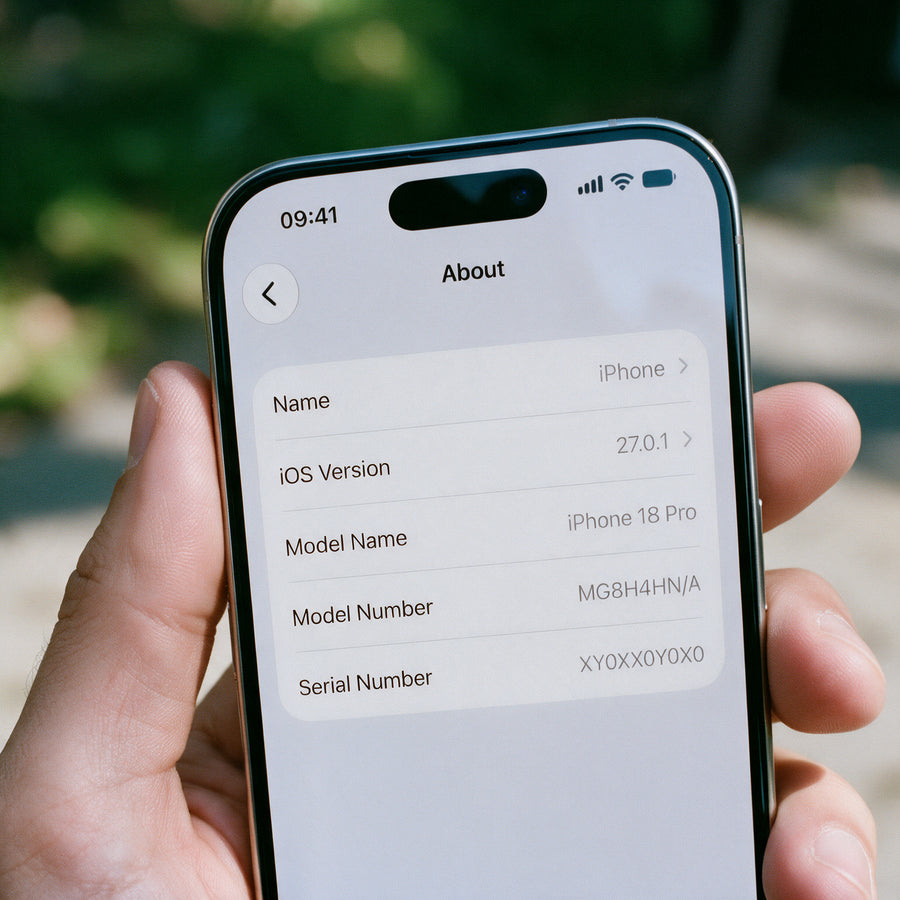
Still on an older iPhone? Same path. Settings → General → About → Model Name.
What about Model Number?
Model Number (the Axxxx code) is for Apple support and parts. Useful if you're stuck. For shopping our cases, Model Name is the one that matters.
Match the name to the case
Your Model Name should match the product title word for word.
- iPhone 18 Pro Max → cases labeled iPhone 18 Pro Max
- iPhone 18 Pro → cases labeled iPhone 18 Pro (not Pro Max)
- iPhone Duo → Duo cases built for that device
If the title says Pro Max and your phone says Pro, it's the wrong case. Close enough doesn't count.
Older iPhones & "I'm not sure"
If your Model Name doesn't look like our current lineup, or Settings says something you don't recognize:
- Double-check Model Name (not Model Number).
- Compare it to the device listed on the product page before you add to cart.
- Still stuck? We'll help.
Quick check
| You see in Settings | Shop for |
|---|---|
| iPhone 18 Pro Max | iPhone 18 Pro Max |
| iPhone 18 Pro | iPhone 18 Pro |
| iPhone Duo | iPhone Duo |
| [other Model Name] | Exact matching title |